
Every day, millions of professionals sit at computers typing information from one place into another. Sales reps log meeting notes into CRMs. Accountants transcribe invoices into accounting systems. Healthcare workers enter patient information into electronic health records. Operations teams update spreadsheets with production data. It's so commonplace we barely question it.
But manual data entry is quietly devastating business productivity, accuracy, and profitability in ways most organizations don't fully appreciate until they calculate the true cost.
The Error Rate Reality
Let's start with accuracy. The average error rate in manual data entry is about 1%, meaning one mistake for every 100 data points entered. That might sound acceptable—99% accuracy feels pretty good, right? But context matters enormously, especially when it comes to CRM data that drives business decisions.
Consider a typical calibration process with 20 data points. With a 1% error rate, every fifth calibration will include faulty data—that's 20% of all calibrations containing errors. In a facility performing 10,000 calibrations annually, that's 2,000 calibrations with inaccurate data.
Now consider that many data entry processes involve two-phase entry: written down initially (say, on paper in the field), then typed into a computer system later. This doubles the error opportunities, meaning approximately 40% of calibrations will include faulty data when using manual two-phase systems. Four thousand out of 10,000 calibrations compromised by human error.
The situation gets worse with complexity. Research shows that when manually inputting data into simple spreadsheets, the probability of human error ranges between 18% and 40%. In complex spreadsheets, accuracy decreases further. It's not that people are lazy or incompetent—it's that humans aren't designed for perfect accuracy in repetitive, tedious tasks.
Compare this to automation: automated data entry systems achieve accuracy rates of 99.959% to 99.99%. For 10,000 data entries, automated systems make between 1 and 4 errors, while humans commit between 100 and 400 errors. Humans make 100 times more data entry errors compared to automated systems.
The Exponential Cost of Errors
The 1-10-100 rule quantifies how error costs compound based on when they're discovered. It costs $1 to prevent an error at the data entry stage, $10 to correct it during data validation, and $100 to fix it during data analysis. Errors caught late don't just cost more money—they can destroy entire projects.
Poor data quality costs organizations an average of $12.9 million annually. That's not just the direct cost of fixing mistakes—it includes operational inefficiencies, financial losses from bad decisions based on bad data, regulatory non-compliance penalties, and reputational damage.
In industries like pharmaceuticals, food and beverage, or aerospace, data entry errors can lead to dangerous product defects, regulatory violations, massive recalls, and even threats to human safety. The stakes extend far beyond inconvenience.
The Time Theft Problem
Manual data entry doesn't just create errors—it consumes staggering amounts of productive time. HR teams using manual data entry spend between 15% and 50% of their time managing information by hand. That's up to half of every workday spent on tasks that generate zero strategic value.
For sales teams, the time burden is similarly oppressive. Data entry ranks as the top automated task across industries at 38%, but that means 62% of companies still handle it manually. Sales reps spend 20-30% of their week on CRM data entry—time that could be spent selling, building relationships, and closing deals.
Think about the opportunity cost. If your sales team spends 10 hours per week on data entry, that's 10 hours they're not prospecting, conducting discovery calls, presenting solutions, negotiating contracts, or nurturing customer relationships. For a team of 20 reps, that's 200 hours weekly—effectively four full-time positions consumed by administrative work.
The average salary for data entry specialists is modest, but when highly-paid professionals—sales reps, engineers, healthcare providers, financial analysts—spend significant time on data entry, the true cost skyrockets. A $150,000/year sales rep spending 10 hours weekly on data entry represents approximately $36,000 annually in opportunity cost per person.
The Morale and Retention Impact
81% of workers agree that automation can leave more time to focus on valuable tasks. Nobody enters their career dreaming about typing data into forms all day. Manual data entry is mind-numbing, repetitive, and feels like a waste of human potential.
This monotony impacts morale, engagement, and retention. Top performers—the people you most want to keep—are the ones most likely to leave when their talents are squandered on administrative busywork. They know their skills are valuable elsewhere, in organizations that respect their time by automating the tedious stuff.
Data Entry Specialists typically stay in their roles for about 2.5 years on average, often using the position as a stepping stone. When you force skilled professionals to do excessive data entry, you create the conditions for turnover.
The Scalability Constraint
Manual processes lack business flexibility—if demands scale up or down, you need to worry about staffing demands. Seasonal fluctuations, sudden growth, or unexpected demand spikes require hiring, training, and managing additional staff. If you can't scale your team effectively, you miss opportunities, disappoint customers, and damage your reputation.
Automation scales instantly. Whether you need to process 100 or 100,000 transactions, automated systems handle the load without additional headcount, training time, or management overhead.
The hidden cost of manual data entry isn't just the direct expense of employing people to do it. It's the compounding effect of errors that multiply through your systems, the opportunity cost of talented people doing work machines should handle, the morale drain that drives turnover, and the inability to scale efficiently. When you calculate the total cost honestly, the case for automation becomes overwhelming.

The business case for data entry automation isn't subtle. Organizations across industries are implementing automation at accelerating rates because the benefits are immediate, measurable, and substantial.
Accuracy That Changes Everything
The leap from 96-99% accuracy (human) to 99.95-99.99% accuracy (automated) fundamentally changes what's possible. When you can trust your data is correct, you can:
One wholesale manufacturer reported that before automation, they processed 1,000 orders with an expected 10 errors. Those 10 errors meant order corrections, customer complaints, delayed shipments, and lost profit on affected transactions. After automation, 95% of orders process in under two minutes with no errors, and 83% require zero human intervention.
Time Reclamation That Multiplies Value
Automation reduces manual data entry work by 80%. That's not 80% faster—it's 80% eliminated. For a team spending 20 hours weekly on data entry, automation reclaims 16 of those hours for higher-value work.
What can your team accomplish with 16 extra hours per week? Sales teams make more calls. Customer service teams handle more inquiries. Analysts spend more time analyzing and less time compiling. Engineers focus on engineering instead of documentation.
The productivity gains compound. While 30% of companies now use automation tools for basic data entry, they still rely on human specialists for quality control and complex tasks. This means automation doesn't eliminate jobs—it elevates them. Data entry specialists become data quality analysts, exception handlers, and process optimizers.
Cost Savings That Flow to the Bottom Line
The ROI of data entry automation is typically stunning. Organizations report:
Financial institutions implementing automation for transaction data entry report automation rates of up to 90%, virtually eliminating manual entry for routine transactions and freeing staff to handle exceptions and provide personalized service.
Compliance and Auditability That Reduce Risk
Poor data quality hurts your ability to meet compliance guidelines, and manual data entry limits your ability to create a paper trail. Industries with strict regulatory requirements—healthcare, finance, pharmaceuticals, aerospace—face enormous penalties for data inaccuracies.
Automated systems create perfect audit trails. Every data point has a timestamp, source, and history. Changes are logged automatically. When regulators come calling, you have comprehensive documentation generated as a byproduct of your automated processes, not as a separate compliance burden.
The reduction in compliance risk alone justifies automation investment for many regulated industries. One healthcare provider implementing automated data entry avoided thousands of dollars in potential HIPAA violations by eliminating transcription errors in patient records.
Operational Efficiency That Enables Growth
Perhaps the most transformative benefit is operational efficiency that enables business models previously impossible. Same-day order processing. Real-time inventory management. Instant quote generation. Immediate customer onboarding.
When data flows automatically between systems, your operations accelerate. What once took days now takes hours. What took hours now takes minutes. This speed becomes a competitive advantage customers notice and value.
Employee Satisfaction That Reduces Turnover
About 70% of Data Entry Specialists report being satisfied with their jobs, mainly due to flexibility and relatively low stress. But when you ask skilled professionals to do excessive data entry, satisfaction plummets.
Automating tedious work improves engagement. Employees appreciate organizations that respect their time and talents. They're more productive, more creative, and more likely to stay when they can focus on work that matters.
The Competitive Imperative
The most compelling reason businesses race to automate isn't just internal benefits—it's competitive survival. The global data entry software market is expected to grow at a CAGR of 7.8% from 2024 to 2031. Your competitors are automating. If you're still manually entering data while they've automated, you're operating at a structural disadvantage in speed, accuracy, and cost.
The gap between automated and manual operations widens daily. Early automation adopters pull further ahead while manual processes fall further behind. The window for catching up narrows as automation becomes table stakes rather than competitive advantage.
The data entry automation market isn't just growing—it's exploding. The statistics tell a story of widespread transformation across industries, company sizes, and geographies.
Market Size and Growth
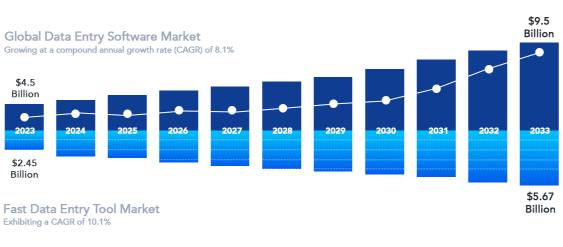
The global data entry software market was valued at approximately $4.5 billion in 2023 and is expected to reach around $9.5 billion by 2033, growing at a compound annual growth rate (CAGR) of 8.1%. That's more than doubling in a decade, reflecting massive investment and adoption.
Breaking it down further: The Fast Data Entry Tool Market size was valued at $2.45 billion in 2024 and is projected to reach $5.67 billion by 2033, exhibiting a CAGR of 10.1%. The acceleration is unmistakable—as technology improves and adoption barriers fall, growth rates increase.
The automatic identification and data capture market was valued at $69.81 billion in 2024 and is projected to reach $136.86 billion by 2030, growing at a CAGR of 11.7%. This broader category—encompassing barcodes, RFID, OCR, and other automated data capture technologies—shows the full scope of the shift away from manual data entry.
Adoption Rates and Usage
38% of companies now automate data entry tasks across industries, making it the most commonly automated business process. Document management follows at 32%, lead nurturing at 30%, and inventory control at 27%.
But adoption varies significantly by sophistication. While 30% of companies use automation tools for basic data entry, they still rely on human specialists for quality control and more complex data tasks. Automation is supplementing, not wholesale replacing, human work—at least for now.
Geographic patterns reveal interesting trends. North America dominates the market, with nearly 70% of businesses having implemented some form of data automation software. Europe follows with steady growth driven by the EU's Digital Strategy. Asia Pacific is expected to witness the highest growth during the forecast period due to rapid digital adoption in emerging economies like China, India, and Southeast Asian nations.
Technology Driving Growth
The market is driven by growing need for automation and efficiency, and rising volume of data and data-driven decision making. As businesses generate vast amounts of data through various touchpoints, manual processing becomes impossible.
The integration of advanced technologies is accelerating adoption: Integrating data entry software with emerging technologies like AI, ML, robotic process automation (RPA), and natural language processing (NLP) opens up new possibilities for automation and data analysis.
According to the International Data Corporation (IDC), the global datasphere is expected to reach 175 zettabytes by 2025, highlighting the urgent need for advanced data management tools. Manual methods simply can't scale to handle this data explosion.
Industry-Specific Growth
Certain industries lead adoption: The BFSI (Banking, Financial Services, and Insurance) segment accounts for the largest share in automatic identification and data capture adoption, driven by regulatory requirements for accuracy and the high cost of errors in financial transactions.
The transition from paper records to electronic health records (EHR) systems has increased the need for automated data entry in healthcare. The U.S. government actively promotes EHR adoption, creating massive demand for data entry automation in medical settings.
Retail is experiencing explosive growth in automation. The retail segment is estimated to witness the fastest growth, with growing adoption of barcode and RFID tags in supply chain management, billing, and order replenishment.
Cloud Adoption Accelerating Everything
Cloud-based deployment accounts for the largest market share in data entry software due to inherent advantages in scalability, cost-effectiveness, and accessibility. Cloud solutions eliminate upfront infrastructure investment, provide automatic updates, and enable remote access—particularly important for distributed workforces.
The shift to cloud has been dramatic. In 2008, only 12% of businesses used cloud-based CRM or data entry systems. Today, the figure exceeds 87%, and it continues climbing as holdouts recognize the cloud's overwhelming advantages.
The AI Inflection Point
We're entering a new phase where AI fundamentally changes what's possible with data entry automation. AI-related tasks on automation platforms have grown over 760% in the last two years, making AI the fastest-growing category.
AI doesn't just automate data entry—it understands context, corrects errors, extracts meaning from unstructured data, and learns from patterns to improve over time. This intelligence gap between traditional automation and AI-powered solutions is creating a new competitive divide.
Investment and Innovation
The explosion in venture capital flowing into automation startups signals confidence in the sector's future. Tools like Zapier, which connects apps and automates workflows, have achieved massive valuations based on solving data movement and entry problems.
Zapier revenue grew from $150 million in 2021 to $310 million in 2024, with projections reaching $400 million in 2025—representing 29% year-over-year growth. This growth reflects widespread recognition that automation isn't optional—it's essential.
The market momentum is undeniable. Data entry automation is transitioning from early adopter advantage to mainstream necessity. The question for businesses isn't whether to automate, but how quickly they can implement automation before competitors leave them behind.
While data entry automation applies broadly across business functions, CRM data entry represents a particularly critical—and challenging—use case that demands specialized solutions.
Why CRM Data Entry Is Different
Not all data entry is created equal. Entering invoice line items from a PDF into an accounting system is structured, predictable work that optical character recognition (OCR) handles well. Extracting patient vitals from medical devices into EHR systems follows defined protocols perfect for automation.
CRM data entry is fundamentally different because it's unstructured, contextual, and relationship-driven. After a sales meeting, what should the rep capture? Meeting notes that explain what was discussed, customer concerns that reveal buying signals, competitive intelligence that informs strategy, relationship dynamics that affect deal timing, next steps that ensure opportunities advance, and context that helps colleagues understand the situation.
This information doesn't exist in a scannable document or device output. It exists in the sales rep's head immediately after the conversation and begins fading from memory within hours. Traditional automation approaches—OCR, form scanning, device integration—don't apply because there's no existing data source to automate from.
The Current State of CRM Automation
Most CRM automation today focuses on data movement rather than data capture. Tools like Zapier excel at connecting systems and moving information between them: Over 2.2 million businesses use Zapier for automation workflows, with around 38% leveraging automation for data entry reduction.
These integration platforms solve important problems. When a lead fills out a web form, Zapier can automatically create a CRM contact, assign it to the right rep, send a notification, and trigger a follow-up email sequence. For marketing operations, lead capture, CRM updates, and pipeline notifications are automated frequently via Zapier.
This automation eliminates manual steps for structured data that originates in other systems. But it doesn't address the core CRM data entry challenge: capturing unstructured information from human interactions—meetings, calls, conversations—and transforming it into structured CRM records.
The Integration Platform Approach
Zapier connects and automates tasks between 7,000+ apps through zaps, or trigger-based workflows. The platform has achieved remarkable success by making it possible for non-technical users to create sophisticated automation.
For CRM workflows specifically: When a lead fills out a form on your website, Zapier can automatically create a contact in your CRM, tag them based on interest, and assign a follow-up task to the right rep—creating a faster, cleaner, more consistent pipeline.
Integrating your CRM with Zapier allows you to automate repetitive sales and marketing tasks like lead assignment, email follow-ups, or pipeline updates without writing code. This eliminates significant manual work and reduces human error in routine processes.
The value is real and substantial. Organizations implementing comprehensive Zapier-CRM integrations report:
But There's Still a Gap
Integration platforms are transformational for structured data workflows, but they hit limitations with unstructured human interactions. After a sales rep completes a customer meeting, Zapier can't automatically extract and log what was discussed. After a support call, integration tools can't capture the conversation context and customer sentiment.
The rep still needs to manually write up meeting notes, update opportunity stages, log activities, and capture next steps. But here's the catch: most of that activity doesn't happen in your CRM. It's happening on your website, in your inbox, through social media, at events, or across dozens of other tools your team relies on every day.
This is the frontier challenge: bridging the gap between human interactions and CRM systems. The information exists in conversations, meetings, and calls. It needs to end up in CRM fields. The question is how to capture and structure it without requiring reps to spend hours typing. Learn more about how modern solutions address this challenge.
The Email Integration Approach
Many CRM platforms offer email integration that automatically logs emails and creates activities. When a rep sends or receives an email from a CRM contact, the system captures it. This helps with some communication tracking but doesn't solve the meeting notes problem or capture the context and intelligence from conversations.
Email integration also creates its own challenges—every email thread gets logged, creating noise and clutter that makes it harder to find the important information. Reps spend time managing what gets logged rather than just capturing what matters.
The Mobile CRM Approach
CRM vendors have invested heavily in mobile apps designed for field sales teams. The idea is making it easy to log activities from phones so reps can update CRM between meetings rather than waiting until evening.
But typing on mobile keyboards is still painful. The apps are better than they used to be, but they haven't fundamentally solved the data entry burden—they've just made it slightly more convenient to do from different locations.
There is growing demand for mobile-compatible data entry software, and CRM vendors are responding. But "mobile-compatible" doesn't mean "easy" or "fast" or "enjoyable." It means "technically possible to use on a phone."
What's Actually Needed
The CRM data entry automation challenge requires something different from traditional integration platforms or mobile apps. It needs technology that:
This is where voice-to-CRM solutions represent a genuinely different category from integration platforms. They're not moving data between systems—they're creating data from human communication and intelligence. The technology requirements, the use cases, and the impact are fundamentally distinct from what Zapier and similar platforms provide.
Both integration automation and capture automation are essential for modern CRM operations. But they solve different problems, and organizations need both to achieve truly comprehensive automation.
Despite remarkable progress, data entry automation still faces significant limitations that prevent complete elimination of manual work. Understanding these constraints helps set realistic expectations and identify where innovation is still needed.
The Unstructured Data Challenge
Automation excels with structured, predictable data. Forms with defined fields, documents with consistent formats, transactions with standard elements—these scenarios work beautifully with current automation technology.
But business reality is messy. Customer conversations don't follow templates. Meeting discussions meander through topics. Sales objections come in countless variations. Competitive intelligence emerges from subtle comments. Buying signals appear in tone and body language, not just words.
Current automation struggles with this unstructured reality. Medical record abstraction (MRA), which involves extracting information from free-form medical notes, has error rates ranging from 70 to 2,784 errors per 10,000 fields—far higher than structured data entry. When humans write narratively rather than filling forms, automated extraction becomes dramatically harder.
The Context and Intelligence Requirement
Generic automation tools don't understand business context. When processing a sales meeting transcription, they can't distinguish between casual conversation and critical deal information. They can't recognize that a customer's comment about "budget approval timing" is more important than their comment about lunch preferences.
Human data entry operators bring intelligence: understanding what matters, recognizing implications, connecting dots between related information, prioritizing details based on significance, and adapting to unique situations.
Replicating this intelligence requires AI that understands domain-specific context—not just general language processing, but CRM-specific, sales-specific, industry-specific intelligence.
The Integration Complexity Problem
Integrating data entry software with existing systems and databases can be complex, especially if there are legacy systems in place. Many organizations run on aging infrastructure that wasn't designed for modern automation.
Creating automated workflows often requires technical expertise. While tools like Zapier democratize automation for simple workflows, complex scenarios still need developers to build, test, and maintain. This creates bottlenecks and limits how quickly organizations can automate processes.
Initial implementation costs for adopting data entry software involve upfront expenses for licensing, customization, and training. Smaller businesses with limited resources struggle to justify these investments even when ROI is clear.
The Data Quality Input Problem
Automation follows "garbage in, garbage out" principles. If source data is messy, incomplete, or inconsistent, automation amplifies rather than fixes problems. Poor handwriting on scanned forms defeats OCR. Inconsistent naming conventions break automated matching. Missing required fields halt automated workflows.
Organizations often discover they need to clean up data and standardize processes before automation works effectively. This pre-automation work can be extensive and expensive, delaying implementation and reducing enthusiasm.
The Exception Handling Gap
Automation handles the routine brilliantly but struggles with exceptions. When something doesn't match expected patterns—an unusual customer request, a non-standard pricing arrangement, a deal structure that doesn't fit typical categories—automated systems can't adapt.
Companies using automation tools for basic data entry still rely on human specialists for quality control and more complex data tasks. The last 10-20% of work often requires human judgment, meaning you can't fully eliminate data entry staff even with automation.
The Trust and Adoption Barrier
Even when automation works technically, organizational adoption can fail. Employees don't trust the system, managers insist on manual verification, workflows haven't been redesigned to accommodate automation, and cultural resistance undermines implementation.
Organizations seeking data entry software face challenges including initial implementation costs, integration complexities with legacy systems, and the need for significant upfront investment in customization and training. These aren't just technical challenges—they're organizational change management challenges that many implementations underestimate.
The Mobile and Field Limitations
Automation designed for office environments doesn't always translate to field conditions. Spotty internet connectivity disrupts cloud-based automation. Small screens make verification difficult. Voice recognition struggles in noisy environments. Battery life becomes a constraint for mobile automation.
Field sales reps, service technicians, delivery drivers, and other mobile workers face automation challenges that desk workers don't encounter. Solutions need to work in cars, customer sites, and outdoor environments—not just climate-controlled offices with reliable WiFi.
The Cost-Benefit Analysis for Small Volumes
Automation makes sense at scale but can be hard to justify for small-volume processes. If you're only entering 50 records weekly, spending thousands to automate it may not pencil out. This creates a divide where large enterprises automate aggressively while small businesses continue manual methods.
Security and Privacy Concerns
Data security and privacy concerns represent the most substantial challenge, particularly with stringent regulations such as GDPR in Europe and CCPA in the United States. Automated systems that move data between platforms create additional security surfaces to protect.
Organizations in regulated industries face extra scrutiny about how automated systems handle sensitive information. Ensuring automation complies with data protection regulations adds complexity and cost to implementations.
The Voice Recognition Accuracy Challenge
Voice-based automation, while promising, still struggles with accents, technical terminology, background noise, multiple speakers, and distinguishing similar-sounding words. Generic voice-to-text services achieve decent accuracy for casual communication but falter with specialized vocabulary and field environments.
These limitations are all solvable—innovation continues to address them. But they represent the current frontier where manual processes persist not from choice but from technological constraints. The next generation of automation tools must overcome these barriers to achieve truly comprehensive data entry automation.
Data entry automation delivers value across virtually every industry, but specific use cases and implementations vary significantly based on sector-specific needs and workflows.
Sales and Marketing: Lead Capture and CRM Population
Lead generation automation includes triggered emails, follow-up reminders, and lead scoring, with tools routing leads instantly from forms into CRMs, email lists, or Slack. When someone fills out a contact form, attends a webinar, or downloads content, automation creates the CRM record, scores the lead based on behavior, assigns it to the right rep, and triggers appropriate follow-up sequences.
AI-powered lead scoring increases qualified lead volume by up to 50% and conversion by approximately 47%. Instead of reps manually reviewing every lead, automation identifies which prospects warrant immediate attention based on engagement patterns, demographic fit, and behavioral signals.
Email marketing automation delivers extraordinary ROI: Email automation ROI averages $42 for every $1 spent. Automated workflows nurture leads with personalized content based on their actions, moving prospects through the funnel while reps focus on high-value conversations.
E-Commerce: Order Processing and Fulfillment
E-commerce operations automate order entry from websites directly into fulfillment systems, eliminating manual transcription. When customers place orders online, automation: creates warehouse picking lists, generates shipping labels, updates inventory counts, sends confirmation emails, and creates financial records.
In e-commerce workflows, automated order fulfillment, shipping updates, and cross-platform notifications are common automation applications. What once required multiple data entry steps now happens instantly and accurately.
The accuracy improvement is transformative. Manual order processing created frequent errors in address details, product SKUs, quantities, and pricing. Automated processing eliminates these errors, dramatically reducing customer service issues and returns.
Healthcare: Patient Records and Clinical Documentation
The transition from paper records to electronic health records (EHR) systems has increased the need for automated data entry in healthcare. Medical devices now transmit readings directly into patient records. Lab results populate automatically. Prescription systems connect to pharmacy databases.
Healthcare automation includes intelligent appointment scheduling, claims processing, and analyzing mountains of patient data to look for trends and support diagnosis. One healthcare office saved more than $4,000 per month by automating some paper-based tasks.
In medical settings, data entry errors range between 0.04% and 0.67%—still significantly higher than in automated systems. Given that medical errors can be life-threatening, the push for automation in healthcare is driven as much by safety as efficiency.
Finance and Accounting: Transaction Processing
Financial institutions implement automation for transaction data entry with success rates of up to 90% for routine transactions. Banking operations automate: check processing through image recognition, credit application data extraction, fraud detection through pattern analysis, and regulatory report generation.
In traditional finance, repetitive tasks like data entry, digitalization, and basic loan processing are being streamlined. Fintech companies leverage automation further by personalizing financial products, automating fraud detection, and expediting loan applications.
The accuracy requirements in finance are unforgiving. A single misplaced decimal can mean millions in errors. Automated systems with 99.99% accuracy provide the reliability financial operations demand while dramatically reducing processing time and cost.
Manufacturing and Logistics: Inventory and Supply Chain
Manufacturing operations automate inventory tracking, production data capture, quality control measurements, and supply chain coordination. RFID tags and barcode scanners eliminate manual counts. Production equipment logs output automatically. Quality metrics populate dashboards in real-time.
The retail segment leads adoption, with growing use of automatic identification & data capture technologies such as barcode & RFID tags in supply chain management, billing, and order replenishment. What once required clipboard-carrying employees manually counting inventory now happens continuously and automatically.
With increasing urbanization and growing demand for consumer goods, the retail business is witnessing continued expansion worldwide, driving AIDC technology adoption in this sector. The scale of modern supply chains makes manual tracking impossible—automation isn't optional, it's mandatory.
Human Resources: Employee Data Management
HR teams using manual data entry lose thousands of hours annually, reporting on past data with questionable accuracy. Automation transforms HR operations by: importing new hire information from applicant tracking systems, updating payroll changes automatically, populating benefits enrollment, generating compliance reports, and syncing data across HR systems.
Depending on which research you read, different studies estimate that HR teams using manual data entry spend between 15% and 50% of their time managing information by hand. Automation reclaims this time for strategic HR work—talent development, culture building, employee engagement—rather than administrative processing.
The accuracy improvement protects companies from expensive errors. One major retailer made headlines for "technical payroll errors" from manual data entry, resulting in staff underpayment, government sanctions, and reputational damage. Automated payroll processing prevents these costly mistakes.
Customer Service: Ticket and Case Management
Support operations automate ticket creation from emails, web forms, and chat interactions. When customers reach out, automation: creates service cases with relevant details, routes tickets to appropriate teams, updates CRM records with support history, tracks resolution time and satisfaction, and generates follow-up communications.
AI-powered automation now handles certain support interactions entirely. A company using Zapier + AI reports 27.5% of IT help desk tickets handled automatically, saving 616 hours per month on IT support and avoiding approximately $500,000 in hiring costs.
The combination of automation and human support creates better customer experiences than either alone. Routine inquiries get instant automated responses while complex issues are routed to specialists with complete context already captured.
Document Processing: Invoices, Contracts, and Forms
Organizations automate extraction of data from PDFs, scanned documents, and images using OCR and intelligent document processing. Invoice processing automation: extracts vendor information, line items, and amounts, matches invoices to purchase orders, routes for appropriate approval, and creates accounting entries.
The accuracy and speed improvements are remarkable. What took hours of manual data entry now takes minutes with automated document processing. Error rates drop from several percent to fractions of a percent. Processing costs decrease by 70-80%.
Contract analysis automation extracts key terms, dates, and obligations from legal documents, flagging important clauses and populating contract management systems. This enables legal teams to focus on negotiation and risk assessment rather than administrative processing.
The explosive growth of integration and automation platforms represents a fundamental shift in how businesses think about data movement and process automation.
The Zapier Phenomenon
Zapier's trajectory illustrates the broader automation trend. Zapier revenue grew from $150 million in 2021 to $310 million in 2024, and is forecast to reach $400 million in 2025—representing approximately 29% year-over-year growth. This isn't a niche tool for tech companies—it's mainstream business infrastructure.
Over 2.2 million businesses reportedly use Zapier for automation workflows, with a large portion being small to medium-sized enterprises. The platform supports over 7,000 app integrations (now reported as 8,000 in 2025), making it possible to connect virtually any business application.
The platform has achieved impressive efficiency metrics. 11 million tasks were automated in 2024 for one case study company alone. Globally, Zapier claims billions of tasks run per year—81 billion tasks to date. The scale of automation happening through integration platforms is staggering.
The Economics of Integration Automation
Average customer lifetime value rose from approximately $400 to $883 over 18 months, while ARPU doubled from $20 to $41.70. These metrics show businesses find increasing value as they expand automation usage. What starts as simple two-step workflows evolves into sophisticated multi-step automations that transform operations.
Monthly churn remains low (less than 5%), thanks to ease of use, scalability, and personalized engagement. Once organizations automate critical workflows, they become dependent on that automation continuing. The switching cost—recreating hundreds of automations in a different platform—creates powerful lock-in.
Common Integration Automation Patterns
Multi-step workflows tying tools like Slack, Notion, Okta, and Zapier Tables are now typical in mid-sized firms. The most common patterns include:
Lead-to-CRM Automation: Web forms, social media, and advertising platforms automatically create CRM contacts with appropriate tagging and routing.
Email-to-CRM Sync: Marketing automation platforms like Klaviyo sync subscriber data, engagement metrics, and campaign responses directly to CRM systems. This eliminates manual export-import cycles and ensures marketing and sales operate from the same customer data.
Cross-Platform Notifications: When significant events occur in one system—a large deal closes, a critical support ticket arrives, inventory drops below thresholds—automation notifies relevant teams through Slack, email, or SMS.
Data Enrichment Workflows: When new contacts enter the CRM, automation calls data enrichment services to append company information, social profiles, and demographic data.
Document Generation: Contract templates, proposals, and reports auto-generate from CRM data, eliminating manual document creation and reducing errors.
The AI Acceleration
AI-related tasks on automation platforms have grown over 760% in the last two years, making AI the fastest-growing category. Zapier positions itself as "the most connected AI orchestration platform" supporting AI Workflows, AI Agents, and AI Chatbots across its app ecosystem.
Within Zapier's own workforce, AI tool usage rose from 65% in late 2023 to 77% by the end of 2024, up to approximately 89% by spring 2025. This internal adoption mirrors broader market trends—AI isn't coming to automation, it's already here.
Businesses deploying AI-powered workflows report reductions in manual ticket hand-offs, faster resolution, and fewer human interventions in routine tasks. AI agents can "train themselves" via workflow data and scale operations without extra headcount.
The Competitive Integration Landscape
While Zapier dominates mid-market automation, enterprise alternatives are growing. Microsoft Power Automate leverages Office 365 integration. Workato focuses on enterprise workflows. Make (formerly Integromat) offers advanced functionality for technical users. Tray.io serves enterprise complexity with sophisticated capabilities.
The market has room for multiple players because different tools optimize for different use cases, user sophistication levels, integration depth, and pricing models. But they all share the same fundamental premise: data should flow automatically between systems without manual intervention.
The Integration Plateau
As powerful as integration platforms are, they're hitting a natural limit: they can only automate what already exists in digital systems. They brilliantly solve the "data in one system needs to appear in another system" problem. They don't solve the "data exists in someone's head and needs to get into any system" problem.
This is why email marketing to CRM automation works beautifully—the email platform has structured data about subscribers, opens, clicks, and conversions that can be automatically synced. But meeting notes to CRM automation doesn't work the same way because the meeting notes don't exist in structured form anywhere. The sales rep needs to create them first.
Integration platforms automate data movement. They don't automate data creation from human intelligence and communication. This distinction is critical for understanding where the next wave of automation innovation must focus.
Beyond Integration: The Capture Challenge
The growing trend isn't just integrating systems better—it's eliminating the need for manual data creation in the first place. Why should a sales rep spend 20 minutes writing up meeting notes that integration platforms then move between systems? Why not capture the meeting intelligence directly in structured form, already formatted for CRM, with no manual typing required?
This is the frontier: automation that works at the point of human interaction, capturing information from conversations, meetings, and calls in real-time, and structuring it appropriately for business systems without requiring manual transcription.
Integration platforms will remain essential for connecting systems and moving data. But the next major automation wave will focus on intelligent capture—creating structured data from unstructured human communication. This is where voice-to-CRM, AI-powered transcription, and intelligent extraction technologies are rapidly evolving.
While integration platforms like Zapier automate data movement between systems, voice-to-CRM solutions solve a fundamentally different problem: capturing human intelligence from conversations and transforming it into structured CRM data without manual typing.
The Capture vs. Movement Distinction
Integration automation assumes data already exists somewhere in digital form. A form submission, an email open, a payment transaction—these create data records that automation then moves, transforms, or acts upon.
Voice-to-CRM automation starts earlier in the chain. The data doesn't exist yet—it's happening in a live conversation between a sales rep and a prospect. The intelligence about customer needs, buying signals, competitive concerns, and next steps exists only in that moment, in spoken words, and in the rep's immediate understanding.
Traditional automation can't help here because there's nothing to automate from. The rep must create the data through manual entry—unless voice technology can capture and structure it directly.
Why Generic Voice-to-Text Isn't Enough
Phone operating systems and many applications offer voice-to-text capabilities. You can dictate messages, documents, or notes. So why isn't this sufficient for CRM data entry?
Generic voice-to-text creates unstructured transcription. It captures everything you say: filler words, conversational asides, thinking out loud, and rambling thoughts. The result is raw text that still requires significant editing, structuring, and organizing before it's useful CRM data.
More critically, generic transcription doesn't understand CRM context. It doesn't know which information should go in the "next steps" field versus the "concerns" field. It doesn't recognize that a customer mentioning "budget approval timeline" is opportunity-stage information while their comment about competitor pricing is competitive intelligence worth flagging.
You still need to cut-and-paste transcribed text into appropriate CRM fields, clean up the language, remove irrelevant content, and structure the information appropriately. This reduces typing time but doesn't eliminate the cognitive burden and time consumption of data entry.
The Intelligence Layer: Context, Structure, and Extraction
Hey DAN and similar voice-to-CRM solutions add an intelligence layer that generic transcription lacks. They combine AI technology with human intelligence to ensure information is captured accurately, formatted properly, and entered into the correct CRM fields. Discover the capabilities that make this possible.
This intelligence means:
Understanding Context: Recognizing which parts of verbal input represent meeting summaries versus action items versus deal updates versus customer objections.
Extracting Relevant Details: Pulling out key information like customer names, deal values, close dates, pain points, and competitive mentions while filtering casual conversation.
Structuring Appropriately: Organizing information into the specific fields your CRM uses, whether standard fields or custom fields unique to your business.
Formatting for Readability: Converting natural speech patterns into clear, professional notes that colleagues can read and understand.
Maintaining Accuracy: Ensuring technical terminology, proper names, and industry-specific language are captured correctly, not garbled by generic speech recognition.
The result is CRM data entry that takes approximately 30 seconds instead of 20-30 minutes—and produces better quality notes because they're captured immediately when memory is fresh.
The Real-World Usage Pattern
Here's how voice-to-CRM works in practice for a field sales rep:
Meeting concludes at 2:00 PM. Rep walks to car by 2:02 PM. While walking or sitting in the car, rep opens the voice-to-CRM app and speaks naturally: "Just finished with Sarah Chen at TechFlow Industries. She's frustrated with current vendor's lack of customization and poor support. Very interested in our automation features for fulfillment process. They're processing 10,000 orders monthly, spending 15 hours per week on manual reconciliation. Budget approved for up to $200K if we demonstrate ROI within 6 months. Main concerns are integration with legacy ERP and training timeline for 25-person team. Send technical integration docs by Friday, schedule demo with IT director next Tuesday, prepare custom ROI analysis. Deal value $175K, target close date July 15th. Also evaluating Oracle but prefer working with smaller vendors."
By 2:03 PM, this information is in the CRM: Contact record updated with current title and concerns. Opportunity record showing $175K value and July 15 close date. Activity logged with detailed meeting notes. Tasks created for sending documentation, scheduling demo, and preparing ROI analysis. Tags applied for competitive threat and buying signals. Custom fields populated with relevant deal details.
Total time invested: 60 seconds of speaking. No typing. No navigating CRM menus. No formatting or structuring. The intelligence layer handled everything.
Why This Matters for Adoption
Remember that CRM adoption rates jump from 40% to 90% when voice-to-CRM solutions eliminate data entry burden. This isn't surprising when you understand what's actually happening.
Reps resist manual CRM data entry because it's genuinely painful: typing on mobile keyboards, spending evenings at computers, losing track of details from earlier meetings, and sacrificing personal time to administrative work. All these friction points disappear with intelligent voice capture.
The adoption transformation isn't about slightly better tools—it's about eliminating the fundamental pain point that causes resistance. When CRM data entry takes 30 seconds of natural speech instead of 30 minutes of typing, the entire dynamic changes. Reps actually want to use it because it makes their lives easier, not harder.
The Data Quality Improvement
Counterintuitively, making data entry easier improves data quality. When logging notes is effortless, reps provide more detail because they're not cutting corners to save time. The completeness, accuracy, and timeliness of CRM data all improve.
Traditional timeline: Meeting ends 2:00 PM. Rep has next meeting at 3:00 PM. Can't log notes between meetings. Has another meeting at 4:00 PM. Drives home by 5:30 PM. Finally sits down at computer by 8:00 PM to log the day's activities. Memory has faded. Notes are sparse, generic, missing crucial details.
Voice-to-CRM timeline: Meeting ends 2:00 PM. Rep logs notes by 2:03 PM while walking to car. Details are fresh, complete, and accurate. Next meeting prep begins with current CRM data. No evening work required.
The improvement in data recency alone is transformative. Managers can see what happened in this morning's meeting within minutes rather than waiting until tomorrow. Opportunities move faster because information flows in real-time.
The Technology Evolution
Voice-to-CRM represents the convergence of several technologies that have matured dramatically in recent years:
Early voice-to-CRM attempts failed because the underlying technology wasn't mature enough. Speech recognition was error-prone. Natural language processing couldn't extract meaning. Mobile devices couldn't handle the computational load. Those limitations no longer apply.
Integration with Existing Workflows
Voice-to-CRM solutions integrate with major CRM platforms—Salesforce, HubSpot, Microsoft Dynamics, and others—working alongside existing systems rather than replacing them. This means organizations can implement voice capture without disrupting current workflows, tech stacks, or user training.
The integration is bidirectional: voice input creates CRM records, and CRM data informs voice processing so the system understands your custom fields, business terminology, and specific workflow requirements.
The Competitive Moat This Creates
Organizations implementing intelligent voice-to-CRM capture build a significant competitive advantage. Their reps spend 6-8 more hours weekly on revenue-generating activities. Their CRM data is complete, current, and accurate. Their managers have real-time visibility. Their forecasts are reliable. Their coaching is effective.
Competitors still requiring manual CRM data entry operate with a structural disadvantage in sales productivity, data quality, and operational intelligence. The gap widens over time as the benefits compound.
This is why voice-to-CRM isn't just another productivity tool—it's a fundamental reimagining of how sales intelligence gets captured and leveraged. It solves the problem integration platforms can't address: creating structured business data from unstructured human communication.
The trajectory of data entry automation is clear: toward complete elimination of manual typing through increasingly intelligent, context-aware systems that work seamlessly across all business processes.
From Automation to Ambient Intelligence
The next evolution isn't just automating data entry—it's making data entry unnecessary as a distinct task. Ambient intelligence systems will capture information passively as work happens, without requiring explicit data entry actions.
Imagine: A sales rep conducts a video call with a prospect. AI listens to the conversation, identifies key discussion points, extracts action items, recognizes buying signals, updates CRM opportunity records, schedules follow-up tasks, and drafts a summary email—all without the rep touching anything after the meeting ends.
A service technician visits a customer site. Their smart glasses capture equipment serial numbers, document repair steps through voice commands, order replacement parts automatically, and update the service database—all hands-free while they work.
A doctor examines a patient. The conversation is analyzed in real-time, clinical notes are generated automatically, relevant lab orders are suggested, prescription interactions are flagged, and the EHR is updated—without the doctor typing a single word or clicking through screens during patient interaction.
This ambient capture is already emerging in early forms. The technology exists. The barrier is refinement, integration, and organizational adoption.
AI That Learns Your Business
Future data entry systems won't just process information—they'll understand your specific business context and learn over time. Machine learning models will recognize your unique terminology, understand your custom workflows, predict what information needs capturing based on deal stage or customer type, and improve accuracy through feedback loops.
A voice-to-CRM system serving a pharmaceutical sales rep will learn the drug names, medical terminology, and regulatory language specific to that industry. The same platform serving a software sales rep will understand technical architecture concepts, deployment models, and integration requirements.
This specialization—AI that adapts to your business rather than forcing your business to adapt to generic tools—will dramatically improve accuracy and relevance.
Multimodal Capture and Fusion
The future combines multiple input modalities: voice capture for natural communication, visual recognition for documents and screens, sensor data from IoT devices, behavioral analytics from user actions, and context awareness from location and calendar.
A field sales rep won't just dictate notes—the system will also capture the business card they photographed, the product brochure the customer was reviewing, the demonstration they conducted, and the building location for future reference. All of this merges into a comprehensive record without manual data entry.
Predictive and Proactive Automation
Beyond capturing data, intelligent systems will anticipate needs and act proactively. CRM automation won't just log that a deal reached 90% probability—it will automatically generate the contract, schedule the legal review, alert the implementation team, and reserve capacity in the fulfillment schedule.
When patterns suggest a customer might churn, the system won't just flag it—it will schedule a retention call, analyze past interactions to identify concerns, suggest specific retention offers, and prepare relevant case studies.
The line between data entry automation and business process automation blurs entirely. Data flows automatically, triggers intelligent actions, and drives outcomes without human intervention for routine scenarios.
The Human-AI Collaboration Model
The future isn't AI replacing humans—it's AI amplifying human capabilities by eliminating tedious work and surfacing insights. Sales reps won't spend time logging activities; they'll spend time acting on AI-generated insights about customer patterns, deal risks, and opportunity priorities.
Automated systems will handle the 80-90% of scenarios that follow predictable patterns, escalating edge cases and exceptions to humans for judgment. This division of labor plays to each party's strengths: AI for speed, consistency, and pattern recognition; humans for creativity, empathy, and novel problem-solving.
Universal Integration and Interoperability
The proliferation of business applications creates integration complexity, but emerging standards and platforms are solving this. APIs become ubiquitous and standardized. Integration platforms connect everything. Data flows freely between systems without custom coding.
In this future, implementing automation doesn't require months of custom development. You specify what should happen, the platform connects the necessary systems, and automation goes live in hours or days rather than months.
Real-Time Everything
The latency between when something happens and when data systems reflect it approaches zero. Customer interactions update CRM instantly. Inventory transactions adjust ordering automatically. Financial data flows to accounting in real-time. Business intelligence dashboards show current state, not yesterday's snapshot.
This immediacy transforms decision-making. You're not analyzing what happened last week—you're responding to what's happening right now. Opportunities are pursued immediately. Problems are addressed before they escalate. Business becomes more responsive and adaptive.
Democratization of Automation
Advanced automation capabilities currently requiring technical expertise will become accessible to non-technical users. No-code and low-code platforms make it possible for business users to create sophisticated automations without developers.
This democratization accelerates automation adoption because business users understand their workflows better than IT departments and can implement solutions faster without waiting for technical resources.
The Convergence Point
All these trends converge toward a future where data entry as a distinct, manual activity essentially disappears. Information flows automatically from its source—human conversations, business transactions, system events—into appropriate databases and applications without manual intervention.
We're not there yet. Manual data entry persists for many scenarios because the technology, integration, or organizational readiness isn't sufficient. But the direction is unmistakable and the pace of progress is accelerating.
The organizations thriving in this future will be those that embrace automation early, invest in systems that eliminate friction, and reimagine processes around automated data flow rather than manual data entry.
The question isn't whether data entry will be automated—it's how quickly your organization can implement automation before competitors leave you behind operating with manual processes in an automated world.
Starting the Journey
For organizations still heavily reliant on manual data entry, the path forward has never been clearer:
The future of data entry isn't manual typing interrupted by occasional automation. It's automated intelligence interrupted by occasional human judgment. The transition is happening now. The only question is whether you'll lead it or follow it.
Organizations implementing comprehensive data entry automation today—eliminating manual CRM data entry, automating document processing, connecting systems seamlessly—are building the operational foundation for the next decade of competitive advantage. Those still manually entering data are accumulating technical debt and operational friction that compounds daily.
The path is clear. The technology exists. The ROI is proven. The time to act is now, before your competitors automate their way to insurmountable advantages in speed, accuracy, and efficiency.
Data entry automation isn't the future—it's the present for leading organizations. The question is when you'll join them.


